



If you want to learn the difference between crawling and indexing in SEO, you’re already making progress. These two steps are key to how search engines like Google find, review, and show your content in search results.
Many website owners spend a lot on content and backlinks, but miss a key point. If your site isn’t crawled and indexed correctly, it won’t show up in search results, no matter how good your content is.
Table of Contents:
- Introduction to Crawling and Indexing
- What is Crawling in SEO? (Deep Dive)
- What is Indexing in SEO? (Deep Dive)
- What is the Difference Between Crawling and Indexing in SEO?
- Why Crawling and Indexing Are Critical for SEO Success?
- The Step-by-Step Process: From Crawling to Ranking
- How Googlebot Works?
- Factors That Affect Crawling
- Factors That Affect Indexing
- Common Crawling Problems (And Solutions)
- Common Indexing Problems (And Solutions)
- Advanced SEO Techniques to Improve Crawling
- Advanced SEO Techniques to Improve Indexing
- Tools to Track Crawling and Indexing
- Real-World Examples
- Frequently Asked Questions (FAQs)
- Final Thoughts
- Strong Call to Action
Introduction to Crawling and Indexing
Search engines operate like massive digital libraries. But before your website can be included in that library, it must go through two critical steps: crawling and indexing.
Understanding the difference between crawling and indexing in SEO is essential, as these processes determine whether your website can appear in search engine results pages (SERPs).
Here’s the simplest way to think about it:
- Crawling = Discovery
- Indexing = Storage and Understanding
What is Crawling in SEO? (Deep Dive)
- Google starts with a list of known URLs
- It sends bots to visit those pages.
- Bots scan the page’s content and code.
- Bots follow links to other pages.
- The process repeats continuously.
Types of Content Crawled
- Web pages (HTML)
- Images
- Videos
- PDFs
- JavaScript-rendered content
- Page content
- Keywords
- Internal links
- External links
- Metadata
- Site authority
- Content freshness
- Update frequency
- Server performance
What is Indexing in SEO? (Deep Dive)
Once a page is crawled, it doesn’t automatically appear in search results. It must first be indexed.
Indexing is the process by which search engines:
- Analyze content
- Understand its meaning
- Store it in their database.
- Page relevance
- Content quality
- Keyword usage
- User experience signals
- Duplicate content issues
What is the Search Index?
The index is essentially a massive database of web pages that search engines can pull from when users perform searches.
Think of it like:
- Crawling = finding books
- Indexing = cataloging books in a library
What is the Difference Between Crawling and Indexing in SEO?
Let’s clearly answer the core keyword:
What is the difference between crawling and indexing in SEO?
At its core, crawling and indexing are two separate but connected processes that search engines use to make sense of the internet.
Crawling is the first step. It refers to the process of discovering web pages. Search engines send out bots, such as Googlebot, to crawl the web, follow links, and find new or updated content. The main goal of crawling is simple: to locate pages that exist online.
Indexing, on the other hand, comes after crawling. Once a page is discovered, search engines analyze its content and decide whether to index it. This process involves understanding what the page is about, evaluating its quality, and organizing it so it can appear in relevant search results. The goal of indexing is to make that content searchable.
In terms of order, crawling always happens first, followed by indexing. Without crawling, a page cannot be found. Without indexing, a page cannot appear in search results.
The tools and controls involved also differ. Crawling is primarily managed through elements such as internal links and the robots.txt file, which tell search engine bots which pages they can access. Indexing, however, is influenced by factors such as meta tags (like “noindex”), content quality, keyword relevance, and overall user experience.
To put it simply:
- Crawling is about finding your page.
- Indexing is about understanding and storing your page.
Simple Explanation
- Crawling is about finding your page.
- Indexing is about understanding and saving your page.
- Crawled but not indexed ❌
- Indexed but outdated ⚠️
- Both crawled and indexed ✅
Why Crawling and Indexing Are Critical for SEO Success?
Why It Matters
- No crawling = your page isn’t discovered.
- No indexing = your page won’t appear in search results.
- Poor indexing = low rankings
- Lost traffic
- Reduced leads
- Lower conversions
- Weak online presence
The Step-by-Step Process: From Crawling to Ranking
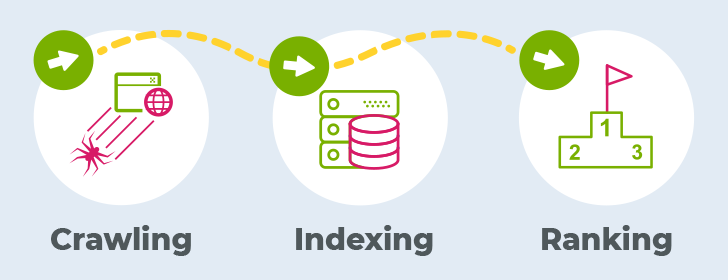
To truly understand the difference between crawling and indexing in SEO, you need to look at the entire journey a webpage takes before it appears on Google. SEO isn’t just about creating content, it’s about making sure that content successfully moves through a three-stage pipeline: crawling, indexing, and ranking.
1. Crawling → Search Engines Discover Your Page
This is the very first step in the process. If your page is not crawled, nothing else matters.
Search engines use bots (such as Googlebot) to crawl the internet. These bots move from page to page by following links. When they land on your website, they scan the page’s content, structure, and links.
What actually happens during crawling?
- The bot reads your HTML code.
- It identifies links (internal and external)
- It checks images, scripts, and other resources.
- It looks for signals like sitemaps and robots.txt
Example:
- You link to it from another page.
- It’s included in your XML sitemap.
- Another website links to it.
👉 “Does this page exist?”
2. Indexing → Your Page is Stored and Categorized
Once your page is crawled, the next step is indexing—but not every crawled page gets indexed.
During indexing, search engines try to understand your content and decide whether to store it in their databases.
What happens during indexing?
- Content is analyzed (text, keywords, headings)
- The page’s topic is determined.
- Duplicate content is checked.
- Quality signals are evaluated.
- Metadata (title tags, descriptions) are processed.
Example:
Important Note:
- Crawled but not indexed (common issue)
- Indexed but not ranking well
👉 “Is this page useful enough to keep?”
3. Ranking → Your Page Appears in Search Results
This is the final step and the one most people focus on.
Once your page is indexed, it becomes eligible to appear in search results. But eligibility doesn’t guarantee visibility. Ranking determines where your page appears.
What affects ranking?
- Keyword relevance
- Content quality and depth
- Backlinks (authority)
- User experience (Core Web Vitals)
- Search intent match
Example:
Key Insight:
👉 “Does this page deserve to be shown, and where?”
Why This Pipeline Matters
- If your page isn’t crawled, it won’t be discovered.
- If it isn’t indexed, it won’t be stored.
- If it isn’t properly optimized, it won’t rank.
How Googlebot Works?
To really understand the difference between crawling and indexing in SEO, it helps to look closer at Googlebot, the system that handles crawling. Googlebot is more than a simple bot. It’s a powerful program built to explore, check, and revisit billions of web pages across the internet.
At its core, Googlebot acts like a digital explorer. It continuously scans the web, discovers new content, checks for updates, and sends that information back to Google for processing and indexing.
Googlebot is a web crawler developed by Google. Its job is to visit websites, read their content, and follow links to discover more pages.
But it doesn’t work randomly. Googlebot operates based on:
- Algorithms
- Prioritized URL lists
- Crawl budgets
- Website authority and trust signals
Its Responsibilities (Explained in Depth)
1. Discover New Pages
One of Googlebot’s primary roles is to find new content on the internet.
It discovers pages through:
- Internal links (within your website)
- External backlinks (from other websites)
- XML sitemaps
- Previously known URLs
If you publish a new blog post but don’t link to it anywhere, Googlebot may struggle to find it. This is why internal linking and sitemaps are critical.
👉 Key Insight:
If Googlebot can’t find your page, it can’t crawl or index it.
2. Revisit Updated Pages
Googlebot doesn’t just visit your site once—it comes back regularly.
This is called recrawling.
Why does this matter?
- To detect updated content
- To refresh outdated information
- To maintain accurate search results
Crawl Frequency Depends On:
- How often do you update your content?
- Your website authority
- Server performance
- User demand for your content
Websites that update frequently are crawled more often.
3. Analyze Site Structure
What it looks at:
- Navigation menus
- URL structure
- Internal linking patterns
- Page hierarchy
- Understand relationships between pages.
- Prioritize important content
- Crawl more efficiently
If your important pages are buried deep (5–6 clicks away), Googlebot may not prioritize them.
👉 Key Insight:
Good site structure = better crawlability.
4. Follow Links
Links are how Googlebot moves across the web.
There are two main types:
- Internal links → connect pages within your site.
- External links → connect your site to others.
Example:
- Page A links to Page B.
- Googlebot follows that link.
- Page B gets discovered.
If a page has no links pointing to it, it becomes an orphan page, which is very hard for Googlebot to find.
👉 Key Insight:
Links are the “roads” that guide Googlebot.
Factors That Affect Crawling
2. Internal Linking
3. Page Speed
4. Crawl Budget
5. Robots.txt
Factors That Affect Indexing
1. Content Quality
2. Duplicate Content
3. Meta Tags
4. User Experience
5. Keyword Relevance
Common Crawling Problems (And Solutions)
Understanding what the difference between crawling and indexing in SEO is also means recognizing what can go wrong during the crawling stage. Even well-designed websites can suffer from crawling issues that prevent search engines from discovering important pages.
Let’s break down these common problems in greater detail so you can identify, understand, and fix them effectively.
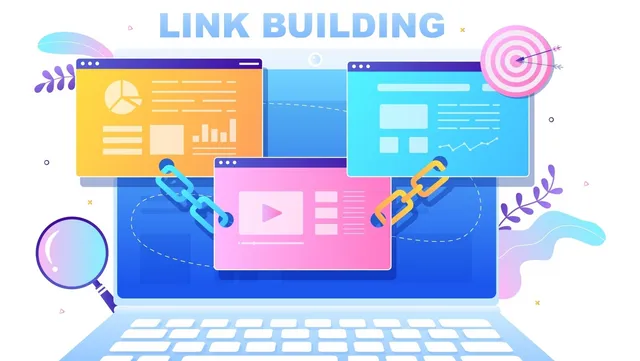
Problem 1: Orphan Pages
Orphan pages are pages on your website that have no internal links pointing to them. This means there is no clear path for Googlebot (or any search engine crawler) to find them as it navigates your site.
Why is this a problem?
- It becomes “invisible” to crawlers.
- It may never be discovered.
- It won’t be crawled or indexed.
Real-world example:
- Add it to your blog category.
- Link it from your homepage.
- Include it in related posts.
Additional risks:
- Wasted content effort (no traffic)
- Poor site structure signals
- Reduced crawl efficiency
Best practices:
- Link the page from relevant blog posts.
- Add it to navigation menus or categories.
- Include it in your XML sitemap.
- Use contextual anchor text.
- Every important page is reachable within 3 clicks.
- No page is left isolated.
If a page isn’t linked, it doesn’t exist in Google’s eyes.
Problem 2: Broken Links
Broken links point to pages that no longer exist or return an error (e.g., a 404 page).
Why is this a problem?
- It reaches a dead end.
- It cannot continue crawling that path.
- Crawl efficiency decreases
This disrupts how search engines navigate your website.
Types of broken links:
- Internal broken links (within your site)
- External broken links (to other websites)
Result:
- Users see an error page.
- Googlebot wastes crawl resources.
- Important pages may be missed.
- Poor user experience
- Loss of link equity (SEO value)
- Negative impact on rankings
1. Fix the link
- Update it to point to the correct page.
- Send users and bots to a relevant alternative page.
- Regularly audit your site using tools like Screaming Frog or Google Search Console.
- Avoid deleting pages without setting redirects.
- Monitor 404 error reports.
👉 Key takeaway:
Broken links waste crawl budget and damage SEO performance.
Problem 3: Blocked Pages
Blocked pages are pages that search engine bots are not allowed to crawl, usually due to rules set in the robots.txt file.
What is robots.txt?
- Which pages can they access?
- Which pages should they ignore?
If a page is blocked:
- Googlebot cannot crawl it.
- It cannot be indexed.
- It will not appear in search results.
Disallow: /
- Your entire site becomes invisible to search engines.
- Blocking important pages (blogs, product pages)
- Leaving staging site restrictions active after launch
- Misconfiguring robots.txt rules
Steps to take:
- Check your robots.txt file (yourdomain.com/robots.txt)
- Ensure important pages are not blocked.
- Use Google Search Console to test your robots.txt
- Only block pages that shouldn’t be indexed (e.g., admin pages)
- Avoid blocking CSS and JavaScript files (Google needs them to render pages)
- Regularly audit your settings.
Just because a page is blocked from crawling doesn’t mean it won’t appear in search results—it may still show without content if indexed elsewhere.
👉 Key takeaway:
Incorrect robots.txt settings can completely destroy your visibility.
Common Indexing Problems (And Solutions)
Problem 1: No index Tags
Pages are excluded.
Problem 2: Thin Content
Pages lack value.
Problem 3: Duplicate Content
Search engines ignore duplicates.
Advanced SEO Techniques to Improve Crawling
- Optimize XML sitemaps
- Improve site architecture
- Use breadcrumb navigation
- Fix redirect chains
- Minimize crawl depth
Advanced SEO Techniques to Improve Indexing
- Use structured data
- Optimize metadata
- Improve content depth
- Avoid keyword stuffing
- Ensure mobile optimization
Tools to Track Crawling and Indexing
Google Search Console
- Index coverage reports
- Crawl stats
- URL inspection
- Crawl audits
- Technical SEO checks
- Site health monitoring
- Indexing insights
Real-World Examples
Example 1: Blog Not Ranking
- Crawled ✔️
- Not indexed ❌
- Cause: Thin content
Example 2: New Website
- Not crawled ❌
- Not indexed ❌
- Cause: No backlinks or sitemap
Example 3: E-commerce Site
- Crawled ✔️
- Indexed ✔️
- Ranking ✔️
Frequently Asked Questions (FAQs)
2. Can Google crawl my site but not index it?
3. How do I force Google to index my page?
4. How long does crawling and indexing take?
5. Why is my page indexed but not ranking?
Final Thoughts
Knowing the difference between crawling and indexing in SEO is more than just basic knowledge. It gives you a competitive advantage.
These two processes determine:
- Whether your site is visible
- Whether your content can rank
- Whether your SEO efforts succeed
Strong Call to Action
If your website is:
- Not getting indexed
- Struggling with visibility
- Losing traffic to competitors
💡 Our team specializes in:
- Technical SEO optimization
- Crawling and indexing fixes
- High-performance content strategies
- Advanced search visibility solutions
👉 Don’t waste time on strategies that don’t work.

📩 Contact us now and turn your website into a powerful traffic and revenue machine.
Contact us:
6420 Richmond Ave., Ste 470
Houston, TX, USA
Phone: +1 832-850-4292
Email: info@excellofficial.com