
Changing your website’s URL is a significant decision. Whether rebranding, moving to a new domain, or restructuring your site, ensuring a seamless transition to avoid losing your hard-earned SEO rankings is essential. At Excell, we’re a digital marketing agency specializing in optimizing online presence. This guide will walk you through the steps to safely change your website URL while preserving your SEO.
Why Changing a Website URL Matters
If not done correctly, changing a website URL can ultimately impact its visibility in search engines, disrupt the user experience, and even result in traffic loss. Proper planning and execution can mitigate these risks and maintain your website’s authority.
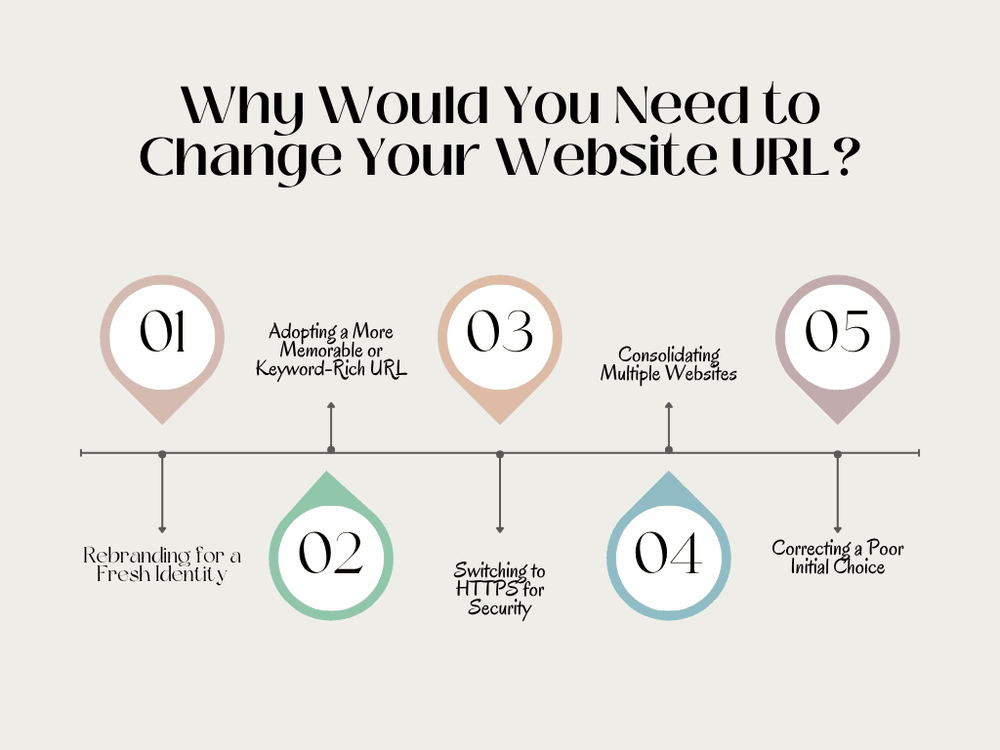
Why Would You Need to Change Your Website URL?
Changing a website URL isn’t a decision to be made lightly, but there are compelling reasons why businesses and website owners might consider it:
5 Questions About Changing a Website URL
- Rebranding: Businesses often change their domain to align with a new brand identity.
- Migration to a new CMS or structure: Switching platforms or restructuring URLs for better navigation.
- Consolidation: Merging multiple websites into one domain.
- Securing a better domain name: Moving to a more memorable or keyword-friendly URL.
- HTTPS Migration: Transitioning from HTTP to HTTPS for enhanced security.
- Impact rankings: Search engines need time to re-index the new URLs.
- Result in broken links: Outdated links may lead to 404 errors.
- Temporarily reduce traffic: Users and search engines may take time to adjust.
- Audit Your Current Site: Use tools like Google Analytics and Screaming Frog to identify all indexed pages and backlinks. This will help you understand your website’s current state and prioritize essential pages during the transition.
- Backup Your Website: Before making changes, ensure a complete site backup. This safety net lets you restore your site if something goes wrong during the migration.
- Set Up the New Domain or URL Structure: Ensure the new URL is live and functional. Test the site on staging servers to verify that all components, including design, content, and functionality, are working correctly.
- Implement 301 Redirects: To pass SEO value set up 301 redirects from old URLs to their new counterparts. Create a comprehensive redirect map to ensure every old URL points to the appropriate new URL, maintaining user experience and link equity.
- Update Internal Links: Replace old links in your website’s navigation, content, and footer with new URLs. Pay special attention to hardcoded URLs in menus, buttons, and CTAs.
- Update XML Sitemap and Robots.txt: Reflect the changes in your XML sitemap and ensure the robots.txt file is accurate. Submit the updated sitemap to search engines to help them crawl the new URLs more efficiently.
- Notify Google: Use Google Search Console’s Change of Address tool to inform Google about the new URL. This tool expedites the recognition and indexing of your new domain.
- Monitor Performance: Track rankings, traffic, and crawl errors post-migration to address any issues quickly. Use tools like Google Analytics and Google Search Console to identify and fix potential problems.
- Google Search Console: To monitor and notify Google of the changes.
- Screaming Frog SEO Spider: To audit and map old URLs to new ones.
- Yoast SEO or Rank Math: To update metadata and generate updated XML sitemaps.
- Ahrefs or SEMrush: To track backlinks and address broken links.
- Uptime Robot: To monitor site uptime during the transition.
- The size of the website.
- How well the transition was managed.
- The speed at which search engines crawl and re-index the new URLs.
Best Practices for a Seamless Transition
- Navigation menus
- Blog posts
- Call-to-action buttons
- Media files and embedded links

- Skipping the Redirects: Neglecting to implement 301 redirects leads to a poor user experience and SEO loss.
- Rushing the Process: Proper planning is essential for a successful transition. Take time to test and verify each step.
- Ignoring Analytics: Failing to monitor post-migration performance can leave issues unresolved. Use analytics tools to stay informed.
- Overlooking Mobile Compatibility: Ensure the new site is mobile-friendly. Search engines prioritize mobile usability in rankings.
- Failing to Update Backlinks: Contact partners, directories, and blogs linking to your old URLs and request updates to avoid losing referral traffic.
Advanced Tips for Preserving SEO
Conclusion

Contact us:
EXCELL INDUSTRIES LLC
6420 Richmond Ave., Ste 470
Houston, TX, USA
Phone: +1 832-850-4292
Email: info@excellofficial.com