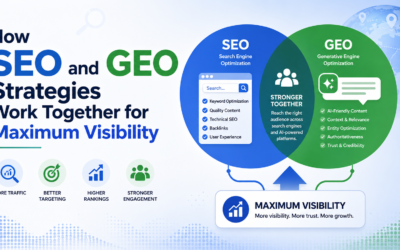




Today, just having a website isn’t enough. Businesses are constantly competing for online visibility, customer attention, and sales. To stand out, your website needs to rank well in search results and deliver a great user experience. That’s why SEO and UX go hand in hand.
SEO helps people find your website, and UX makes sure they enjoy using it once they get there. When you combine both, your site attracts more visitors, keeps them engaged, and helps your business grow.
Google’s algorithms have changed a lot over time. Now, ranking well isn’t just about keywords and backlinks. Search engines look for websites that are fast, mobile-friendly, user-focused, and easy to navigate. So, businesses that focus on both SEO and UX have a real edge over the competition.
If your website has great SEO but poor UX, visitors might leave quickly out of frustration. On the flip side, a well-designed site without SEO may not get enough traffic to succeed. The best websites find a balance between both.
In this guide, we’ll look at why SEO and UX work best together, how they affect your website’s performance, and what you can do to improve both for lasting online success.
Table of Contents:
- What Is SEO?
- What Is UX?
- Why SEO and UX Are Closely Connected?
- How Google Prioritizes User Experience?
- The Role of Website Speed in SEO and UX
- Mobile Optimization and Its Importance
- Navigation and Site Structure
- Content Quality and Readability
- How Core Web Vitals Affect Rankings?
- User Engagement Metrics That Matter
- Accessibility and Inclusive Design
- Visual Design and User Trust
- SEO and UX for Higher Conversions
- Common SEO and UX Mistakes
- Building an Effective SEO and UX Strategy
- The Future of SEO and UX
- Frequently Asked Questions About SEO and UX
- Final Thoughts
- Strong Call to Action
What Is SEO?
SEO, or search engine optimization, is the process of improving a website’s visibility in search engine results pages (SERPs). The goal is to help users discover your website organically when they search for relevant topics, products, or services online.
SEO involves several different areas.
On-Page SEO
On-page SEO focuses on optimizing elements within your website.
Examples include:
- Keyword optimization
- Meta titles
- Meta descriptions
- Header tags
- Internal linking
- Image optimization
- Content structure
On-page SEO helps search engines understand what your content is about.
Technical SEO
Technical SEO ensures search engines can properly crawl, index, and rank your website.
Important technical SEO factors include:
- Site speed
- Mobile responsiveness
- Secure HTTPS connections
- XML sitemaps
- Structured data
- Clean code
Without technical SEO, even great content may struggle to rank.
Off-Page SEO
Off-page SEO focuses on signals outside your website that influence rankings.
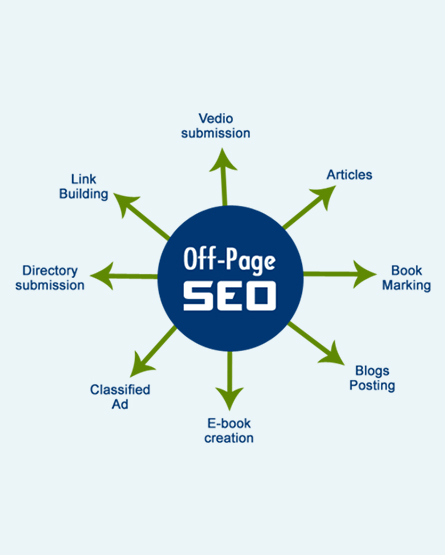
Examples include:
- Backlinks
- Brand mentions
- Online reputation
- Social engagement
Strong off-page SEO improves website authority and credibility.
What Is UX?
UX, or user experience, refers to how users interact with and feel about a website or digital platform. Good UX creates smooth, intuitive, and satisfying experiences.
UX design considers:
- Ease of navigation
- Website speed
- Mobile usability
- Accessibility
- Readability
- Visual appeal
- Interactive elements
- Overall functionality
The purpose of UX is to help users accomplish tasks efficiently and enjoyably.
A positive user experience encourages visitors to:
- Stay longer on the website.
- Explore more pages
- Engage with content
- Complete purchases
- Submit inquiries
- Return in the future.
Poor UX often leads to frustration and lost opportunities.
Why SEO and UX Are Closely Connected?
Years ago, SEO and UX were often treated separately. SEO teams focused on rankings, while designers focused on aesthetics. Today, the digital landscape has changed dramatically.
Search engines now prioritize websites that provide meaningful user experiences. This means SEO and UX directly influence each other.
SEO Brings Users to Your Website
SEO increases visibility in search results and drives traffic.
Without SEO:
- Your audience may never discover your website.
- Competitors may outrank you.
- Organic traffic remains limited.
UX Keeps Users Engaged
Once users arrive, UX determines whether they stay or leave.
Good UX encourages visitors to:
- Read content
- Navigate pages
- Complete actions
- Trust your brand
Together, SEO and UX create websites that attract and retain users.
How Google Prioritizes User Experience?
Google’s primary goal is to deliver the best possible results to users. That means websites providing excellent experiences are more likely to rank well.
Google evaluates several UX-related factors.
Mobile Friendliness

Google uses mobile-first indexing, meaning the mobile version of your site is prioritized.
Page Speed
Slow-loading websites frustrate users and hurt rankings.
User Engagement
Metrics such as bounce rate and dwell time indicate whether users find your content valuable.
Core Web Vitals
Google measures real-world user experiences through performance metrics.
These ranking signals demonstrate the growing connection between SEO and UX.
The Role of Website Speed in SEO and UX
Website speed is one of the most important factors affecting both user satisfaction and search visibility.Users expect websites to load quickly. Studies consistently show that visitors abandon slow websites within seconds.
How Slow Websites Hurt UX
Slow pages create frustration and reduce engagement.
Users may:
- Leave before the page loads.
- Lose trust in the brand.
- Avoid returning in the future.
How Slow Websites Hurt SEO
Google considers page speed a ranking factor.
Slow websites may experience:
- Lower search rankings
- Reduced crawl efficiency
- Higher bounce rates
Ways to Improve Website Speed
Businesses can optimize speed by:
- Compressing images
- Minimizing code
- Using caching
- Implementing CDNs
- Reducing unnecessary plugins
Faster websites create better experiences and stronger rankings.
Mobile Optimization and Its Importance
Mobile traffic now dominates internet usage worldwide. That means mobile optimization is critical for both SEO and UX.
A website that performs poorly on smartphones can lose a significant percentage of visitors.
Why Mobile UX Matters?
Mobile users expect:
- Fast loading
- Easy scrolling
- Responsive layouts
- Readable text
- Touch-friendly navigation
If users struggle to navigate your site on mobile devices, they are likely to leave quickly.
SEO Benefits of Mobile OptimizationGoogle prioritizes mobile-friendly websites because they provide better user experiences.
Responsive design improves:
- Search rankings
- User engagement
- Conversion rates
Businesses that ignore mobile UX risk losing both traffic and customers.
Navigation and Site Structure
Website navigation plays a major role in both SEO and UX.
Users should easily find the information they need without confusion.
Good Navigation Improves UX
Clear navigation reduces frustration and improves engagement.
Benefits include:
- Easier browsing
- Faster information access
- Improved usability
Good Navigation Improves SEO
Search engines use navigation structures to understand website hierarchy.
Proper site architecture helps:
- Search engines crawl pages
- Users discover more content.
- Internal linking distributes authority.
Navigation Best Practices
- Use simple menus
- Organize categories logically
- Include breadcrumbs
- Limit clutter
- Add clear CTAs
Strong navigation benefits both visitors and search engines.
Content Quality and Readability
Content is the foundation of successful SEO and UX.
Google rewards websites that provide valuable, informative, and user-friendly content.
Why Content Matters for UX?
Users visit websites to solve problems or gain information.
Readable content helps users:
- Understand information quickly
- Stay engaged longer
- Trust your expertise
Why Content Matters for SEO?
Search engines analyze content relevance and quality.
High-quality content improves:
- Rankings
- Organic traffic
- Backlinks
- Engagement metrics
Tips for Better Readability
- Use short paragraphs
- Add headings and subheadings.
- Include bullet points
- Avoid jargon
- Write conversationally
Readable content improves both user experience and SEO performance.
How Core Web Vitals Affect Rankings?
Core Web Vitals are a set of performance metrics created by Google to measure the real-world user experience of a website. These metrics focus on how quickly a page loads, how quickly users can interact with it, and how visually stable it remains while loading.
Google introduced Core Web Vitals because user experience has become a major part of search engine optimization. In the past, websites could rank well simply by using keywords and backlinks. Today, Google wants to ensure that websites not only provide relevant information but also deliver smooth, enjoyable experiences for visitors.
That is why Core Web Vitals directly connect technical SEO with UX (user experience).
When a website performs poorly, users often become frustrated and leave before engaging with the content. Google interprets this behavior as a negative experience, which can hurt rankings over time. On the other hand, websites that load quickly and function smoothly are more likely to keep users engaged, thereby improving SEO performance.
Google currently focuses on three primary Core Web Vitals metrics:
- Largest Contentful Paint (LCP)
- Interaction to Next Paint (INP)
- Cumulative Layout Shift (CLS)
Each metric measures a different part of the user experience.
Largest Contentful Paint (LCP)
Largest Contentful Paint measures how quickly the main content of a webpage becomes visible to users.
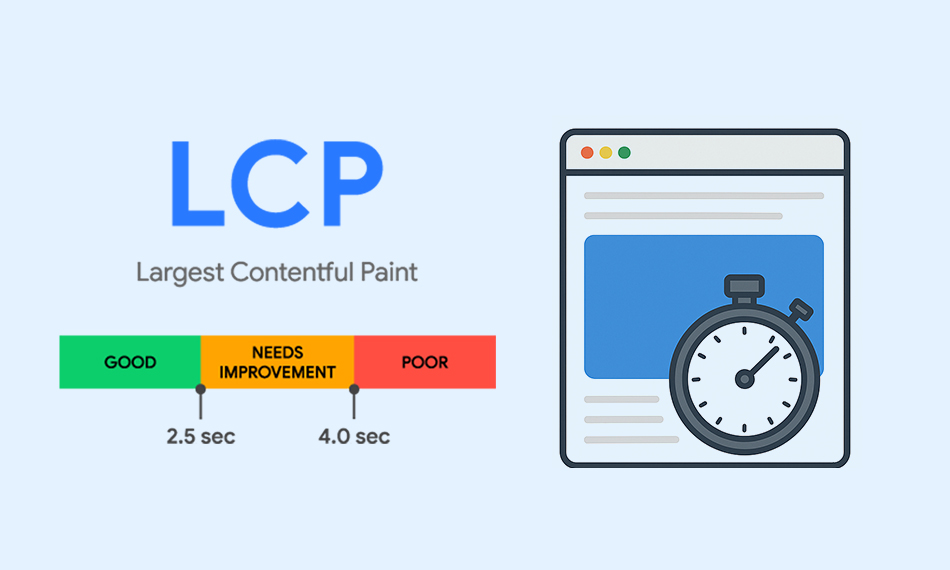
In simple terms, LCP tracks the loading speed of the largest visible element on the screen, such as:
- A large image
- A video banner
- A heading block
- A featured image
- A large text section
The faster this content appears, the better the user experience.
Why LCP Matters for UX?
When users visit a website, they want immediate confirmation that the page is loading properly. If the main content takes too long to appear, visitors may think the website is broken or slow.
Slow loading times often cause:
- Frustration
- Higher bounce rates
- Lower engagement
- Reduced trust in the website
For example, imagine a user clicking on a blog article from Google search results. If the page remains blank for several seconds before the content appears, the user may leave and choose another website instead.A fast LCP reassures users that the website is responsive and functional.
Google’s Recommended LCP Score
Google recommends an LCP score of:
- Good: 2.5 seconds or less
- Needs Improvement: 2.5 to 4 seconds
- Poor: More than 4 seconds
Websites with poor LCP scores may struggle to rank well in search results, especially when competitors offer faster experiences.
Common Causes of Poor LCP
Several issues can slow down LCP performance.
Large Image Files
Uncompressed images are one of the most common reasons pages load slowly.
Slow Web Hosting
Poor server performance increases loading times.
Too Much JavaScript
Heavy scripts delay the rendering of page content.
Render-Blocking Resources
CSS and JavaScript files may cause content to load slowly.
No Content Delivery Network (CDN)
Without a CDN, users far from the server may experience slower loading speeds.
How to Improve LCP?
Businesses can improve LCP by:
- Compressing and resizing images
- Using modern image formats like WebP
- Upgrading hosting performance
- Reducing unnecessary scripts
- Implementing lazy loading
- Using caching systems
- Using a CDN
Improving LCP creates faster, smoother experiences that benefit both users and SEO rankings.
Interaction to Next Paint (INP)
Interaction to Next Paint measures how quickly a website responds when users interact with it.
This metric evaluates the responsiveness of user interactions, such as:
- Clicking buttons
- Opening menus
- Typing into forms
- Navigating tabs
- Interacting with sliders
INP replaced First Input Delay (FID) as Google’s responsiveness metric because it provides a more complete picture of user interaction performance.
Why INP Matters for UX?
Users expect websites to respond instantly when they click or tap.
When websites respond slowly, users may feel:
- Confused
- Frustrated
- Impatient
For example, imagine clicking a “Buy Now” button and waiting several seconds before anything happens. Many users may abandon the process entirely.
A responsive website creates smoother interactions and builds confidence.
Google’s Recommended INP Score
Google recommends:
- Good: Less than 200 milliseconds
- Needs Improvement: 200 to 500 milliseconds
- Poor: More than 500 milliseconds
Fast interaction times are essential for keeping users engaged.
Common Causes of Poor INP
Several technical issues can reduce responsiveness.
Excessive JavaScript Execution
Heavy scripts can block interactions.
Third-Party Plugins
External tools like ads or widgets may slow responsiveness.
Complex Animations
Heavy animations can delay interactions.
Poor Front-End Optimization
Unoptimized code creates lag during interactions.
How to Improve INP?
Businesses can improve responsiveness by:
- Reducing JavaScript usage
- Splitting long tasks into smaller processes
- Removing unnecessary plugins
- Optimizing front-end code
- Using browser caching
- Prioritizing essential interactions
Better responsiveness improves user satisfaction and encourages engagement.
Cumulative Layout Shift (CLS)
Cumulative Layout Shift measures visual stability.
This metric tracks unexpected movement of page elements during page load.
For example:
- Buttons suddenly moving
- Text shifting while reading.
- Images are loading late and pushing content downward.
- Ads appearing unexpectedly
These sudden movements create frustrating experiences.
Why CLS Matters for UX?
Visual instability is one of the most annoying website problems for users.
Imagine trying to click a button, only for the layout to shift, causing you to click the wrong thing.
Poor CLS can lead to:
- User frustration
- Accidental clicks
- Reduced trust
- Higher abandonment rates
Stable layouts create more comfortable browsing experiences.
Google’s Recommended CLS Score
Google recommends:
- Good: Less than 0.1
- Needs Improvement: 0.1 to 0.25
- Poor: More than 0.25
Lower CLS scores indicate more stable pages.
Common Causes of Poor CLS
Several issues contribute to layout instability.
Images Without Dimensions
Images loading without a defined width and height cause shifting.
Dynamic Ads
Ads that load unpredictably cause surrounding content to shift.
Fonts Loading Late
Font changes can shift text placement.
Injected Content
Pop-ups or banners appearing suddenly create instability.
How to Improve CLS?
Businesses can improve visual stability by:
- Setting size dimensions for images and videos
- Reserving space for ads
- Using stable font loading strategies
- Avoiding sudden popups
- Minimizing dynamic content shifts
User Engagement Metrics That Matter
Google evaluates how users interact with websites.
Positive engagement signals often indicate high-quality experiences.
Bounce Rate
Bounce rate measures the percentage of users who leave after viewing only one page.
High bounce rates may indicate:
- Poor UX
- Slow performance
- Irrelevant content
Dwell Time
Dwell time measures how long users stay on a page before returning to search results.
Longer dwell times usually indicate engaging content.
Click-Through Rate (CTR)
Compelling titles and descriptions improve CTR.
Higher CTRs can increase traffic and improve visibility.
Accessibility and Inclusive Design
Accessibility ensures websites are usable for everyone, including people with disabilities.
Inclusive design improves both SEO and UX.
Accessibility Features
Important accessibility elements include:
- Alt text for images
- Keyboard navigation
- Proper color contrast
- Descriptive labels
- Semantic HTML
SEO Benefits of Accessibility
Accessible websites are easier for search engines to crawl and understand.
Improved accessibility can lead to:
- Better usability
- Higher engagement
- Broader audience reach
Businesses that prioritize accessibility create more inclusive digital experiences.
Visual Design and User Trust
Visual design significantly impacts user perception and behavior.
A professional website design builds trust and credibility.
How Design Influences UX?
Good visual design improves:
- Readability
- Navigation
- Engagement
- Emotional connection
How Design Influences SEO?
While visual design itself is not a direct ranking factor, it influences user behavior metrics that affect SEO.
Poor design may increase:
- Bounce rates
- Frustration
- Abandonment
Strong visual hierarchy and clean layouts encourage deeper engagement.
SEO and UX for Higher Conversions
Driving traffic alone is not enough. Businesses need visitors to take action.
This is where SEO and UX become especially powerful together.
SEO Attracts Qualified Traffic
SEO targets users actively searching for relevant solutions.
These users often have higher purchase intent.
UX Encourages Conversion
UX removes obstacles and guides users toward actions.
Examples include:
- Easy checkout processes
- Clear forms
- Strong CTAs
- Simplified navigation
When SEO and UX align, conversion rates often improve dramatically.
Common SEO and UX Mistakes
Many businesses unintentionally damage website performance by overlooking the relationship between SEO and UX.
Keyword Stuffing
Overusing keywords creates unnatural content and poor readability.
Slow Websites
Heavy media files and poor coding slow down performance.
Intrusive Popups
Aggressive popups frustrate users and disrupt experiences.
Poor Mobile Design
Non-responsive websites hurt usability and rankings.
Confusing Navigation
Complex menus discourage exploration.
Avoiding these mistakes improves both user satisfaction and search performance.
Building an Effective SEO and UX Strategy
Successful businesses integrate SEO and UX into a unified strategy.
Step 1: Understand User Intent
Research what users want when searching specific keywords.
Step 2: Optimize Technical Performance
Improve:
- Site speed
- Mobile responsiveness
- Security
- Crawlability
Step 3: Create Valuable Content
Develop informative, engaging, and easy-to-read content.
Step 4: Improve Navigation
Ensure users can quickly find information.
Step 5: Use Analytics
Track metrics such as:
- Bounce rate
- Conversion rate
- Session duration
- User flow
Step 6: Continuously Test and Improve
SEO and UX require ongoing optimization.
Regular testing helps identify areas for improvement.
The Future of SEO and UX
The future of digital marketing will increasingly prioritize user experience.
Search engines continue evolving toward human-centered results.
Emerging trends include:
AI-Powered Search
AI systems analyze user behavior more effectively.
Voice Search Optimization

Websites must provide concise and user-friendly information.
Personalized Experiences
Users increasingly expect tailored content.
Visual Search
Images and videos are becoming easier to search for.
Predictive UX
Websites may anticipate user needs through behavioral data.
Businesses that invest in SEO and UX today will remain competitive tomorrow.
Frequently Asked Questions About SEO and UX
1. What do SEO and UX mean?
SEO refers to search engine optimization, while UX stands for user experience. Together, they help websites rank better and provide positive experiences for visitors.
2. Why are SEO and UX important together?
SEO helps users find your website, while UX keeps them engaged once they arrive. Combining both improves traffic, engagement, and conversions.
3. Does UX affect SEO rankings?
Yes. Google considers UX factors such as page speed, mobile-friendliness, and Core Web Vitals when ranking websites.
4. How can businesses improve SEO and UX at the same time?
Businesses can improve both by:
- Increasing website speed
- Optimizing for mobile devices
- Creating readable content
- Simplifying navigation
- Improving accessibility
5. What happens if a website has good SEO but poor UX?
A website may attract traffic but struggle to convert visitors. Poor UX often leads to high bounce rates and lower customer satisfaction.
Final Thoughts
The relationship between SEO and UX is no longer optional. Businesses that want long-term digital success must understand how these two strategies work together.SEO helps websites gain visibility and attract users, while UX ensures those users have meaningful, satisfying experiences. Together, they improve search rankings, engagement, customer trust, and conversions.
Modern search engines reward websites that prioritize people. That means businesses should focus not only on technical optimization but also on usability, accessibility, and user satisfaction.
Companies that successfully combine SEO and UX gain a major competitive advantage in today’s digital marketplace.
The best websites aren’t just built for search engines; they’re made for people.
Strong Call to Action
At Excell, we specialize in building high-performing websites that combine advanced SEO strategies with exceptional user experiences. Our team understands how to create websites that not only rank higher on Google but also engage visitors and convert them into loyal customers.
Whether you need:
- SEO optimization
- UX-focused web design
- Faster website performance
- Mobile optimization
- Content strategy
- Technical SEO improvements
- Conversion optimization
Excell has the experiences to help your business grow online.
Why Choose Excell?
We don’t believe in outdated SEO tactics or generic website design. We create customized digital strategies focused on real performance, measurable growth, and long-term success.
With Excel, you can:
- Increase organic traffic
- Improve customer engagement
- Reduce bounce rates
- Boost conversion rates
- Strengthen your online presence.
Your website should do more than just exist. It should perform well, convert visitors, and help your business grow.

Partner with Excell Today
If you are ready to elevate your website performance through the perfect combination of SEO and UX, now is the time to act.
Contact us today and Book your free discovery call to get done for your services, performs better, and delivers real business results.
Contact us:
EXCELL INDUSTRIES LLC
6420 Richmond Ave., Ste 470
Houston, TX, USA
Phone: +1 832-850-4292
Email: info@excellofficial.com