


If you want your website to rank better organically and you don’t want it to be competing with its own pages by accident, it’s important to learn how to prevent keyword cannibalization. Keyword cannibalization happens when you have multiple pages that are competing for the same search intent. It can make it hard for search engines to determine which page is most relevant for a given query. Over time, the practice can fragment ranking signals, generate inconsistent search exposure, damage internal link tactics, and complicate content maintenance. In this post, we’ll discuss how keyword cannibalization arises, how to identify it, how to resolve existing issues, and how to avoid future clashes as your website grows.
Table of Content:
- What Is Keyword Cannibalization?
- How Keyword Cannibalization Can Damage SEO?
- Regular Keyword Overlap vs. Keyword Cannibalization
- Typical Reasons for Keyword Cannibalization
- How to Spot Keyword Cannibalization?
- How to Avoid Keyword Cannibalization?
- Create a Strong Keyword Mapping Strategy
- Before creating content, understand search intent.
- Merging Competing Pages
- Enhance Internal Linking
- Properly Use Canonical Tags
- Redirects When Removing Duplicate Pages
- Distinguish Similar Pages
- Optimize Category, Product & Service Pages
- Regularly Monitor Search Performance
- Top Keyword Cannibalization Mistakes to Avoid
- FAQs
- Guard Your SEO Strategy With Excel
1. What Is Keyword Cannibalization?
Keyword cannibalization happens when numerous pages on the same site rank for very similar search queries and, more importantly, satisfy the same search intent.
For example, a digital marketing company may publish the following articles:
- How to Improve Local SEO
- Tips on SEO for Local Small Businesses
- “Best Ways to Optimize Local SEO”
- How to Boost Local SEO
Having many pages that talk about “local SEO” isn’t inevitably a problem. If all four pages give the same advice to the same audience, answer the same questions, and are optimized for the same search intent, they may compete.
The website has split the topic across several similar URLs rather than having one authoritative resource on the subject.
This situation is when troubles with SEO can start.
It’s vital to recognize that just because you are utilizing the same keyword on several pages doesn’t necessarily indicate you are experiencing cannibalization.
Google frequently finds many pages from one website that cover related subjects. The true problem is when multiple URLs are competing to do more or less the same thing.
For example, a personal injury legal site might lawfully have several pages targeting:
- personal injury attorney
- vehicle accident lawyers
- car accident lawyer
- Motorcycle Accident Lawyers
- attorney work injury
All these pages may contain the word “personal injury lawyer,” but they serve different requirements and search intentions.
Often there is keyword overlap.
Things become really messy with search-intent overlap.
2. How Keyword Cannibalization Can Damage SEO
The first thing to do to avoid keyword cannibalization is to know why it matters.
Keyword cannibalization is an SEO problem in many respects.
Search engines may struggle to determine the most relevant page.

When many pages are very similar, search engines have to decide which is the best result.
Sometimes the page you want to rank isn’t the page Google wants to show.
For example, your thorough service page may have more commercial value, but an earlier blog item could begin ranking instead.
That can direct users to a page that doesn’t align with where they are in the purchase path.
Ranking Signals Might Polarize
Multiple URLs may scatter backlinks, internal links, user interaction signals, and topical relevance instead of concentrating them on a single major resource.
Assume that three identical items make:
- Backlinks Page A: 12
- Page B: 9 links to this page
- Page C 14 back links
If all three pages are fundamentally about the same issue, combining the relevant content into a single stronger resource might communicate a clearer authority signal than having three competing pages.
Varied Ratings
One sign of cannibalization is when the same search query returns different URLs again and again.
For example:
Rankings on Page A: Week 1.
Week 2: Page B not found.
Week 3, Page A reappears.
Week 4: Page C begins to rank.
Rank fluctuations alone don’t establish cannibalization, but switching URLs often can mean search engines aren’t sure what site is the best representation of the topic.
Resources May Be Used Inefficiently Crawl
On large websites, you’ll often find hundreds or thousands of URLs. Having many similar pages can require more crawling resources for search engines to access content that lacks unique value.
A cleaner site architecture will allow search engines to grasp the relationship between important content.
Conversion Rates May Suffer
Cannibalization is not only an SEO issue. It can also be a conversion problem. Suppose someone searches for:
“SEO services for business”
You want your page for enterprise SEO services to show up. Instead, Google displays an informational blog titled “What is Enterprise SEO?”
The blog may generate traffic, but the visitor arrives farther away from your desired conversion route.
The page officially ranks, but it’s not necessarily the greatest page for that searcher.
3. Regular Keyword Overlap vs. Keyword Cannibalization
One of the most popular myths in SEO is that you need a completely distinct keyword for every page.
That’s not feasible. Of course, websites debate the same stuff again and again.
A home improvement website might use “roof repair” on:
- a page for a roofer
- an emergency roof page
- article on storm damage
- Guide to Roof Maintenance
- a location-specific roof page
That doesn’t mean that keyword cannibalization happens automatically.
The crucial question is Are these pages answering different search intents?
See example below.
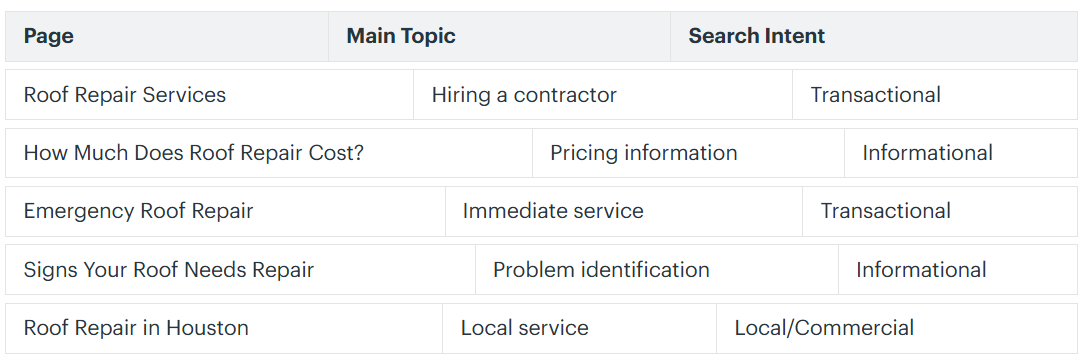
These pages use some of the same words, but for different reasons.
The more pages you have with essentially identical intent, the more likely you are to cannibalize.
For example:
- “Roof Repair Cost Guide”
- Average Cost to Repair a Roof
- If the material on these pages is comparable, we should combine them rather than keep them separate.
- “Roof Repair Cost Breakdown”
If the material is similar, it would be better to combine them.
4. Typical Reasons for Keyword Cannibalization
Keyword cannibalization is often a slow process.
A firm doesn’t often choose to make five pages purposely for the same intent. Rather, the problem increases as content piles up.
Publishing without a keyword map
A team member publishes an article. Months later, another team member writes a similar article without realizing that the first one has already been published.
Years later the site has a handful of articles on almost the same theme.
Creating New Content Instead of Updating Content
Some businesses think that more pages published means better SEO. But, occasionally, it’s better to update an existing high-quality page than write a new article on the same topic.
Before you make something new, ask:
Is the question previously answered on a page we own?
If so, work on that page.
Content planning deficiency
Websites without identifiable topic clusters often create redundant material.
A content strategy that considers structure acknowledges:
- key themes
- supporting subjects
- businesses locations
- Pages of information
- variations of the keyword
- audience purpose
- funnel stage
This arrangement avoids duplication of effort.
Duplicate pages for locations.
Local SEO tactics can end up cannibalizing when companies roll out dozens of similar city sites.
For instance:
- Dallas SEO Company
- Fort Worth SEO Company
- Arlington SEO Agency
- Plano SEO Agency
Location pages can be valid when they offer genuine local value.
But if you alter the city name and do everything else the same, you end up with low-value duplication.
Category and Product Overlapping
E-commerce sites are especially vulnerable.
A product page, category page, filter page, tag archive page, and search page can all be targeting almost the same terms.
The right design and canonicalization are critical for these sites.
5. How to Spot Keyword Cannibalization
Before you understand how to prevent keyword cannibalization, you need to know how to detect it.
There are several ways to help.
Check via Google Search Console.
One of the most helpful tools to detect suspected cannibalization is Google Search Console.
The report allows site owners to evaluate queries, pages, clicks, impressions, CTR and average position. In Google Search Console, you can select a query and then view the Pages view to see the URLs that rank for that query.
It’s a simple process:
- Launch Google Search Console.
- In the Performance area, select Search Results.
- Go to the Queries tab.
- Choose a relevant keyword.
- Click the Pages tab.
- See which URLs are getting impressions for that query.
Seeing more than one page for a single query doesn’t always mean you have a cannibalization problem.
Instead, verify whether those pages have the same purpose.
Conduct a Content Audit
Create a spreadsheet that includes:
- URL
- page title
- key keyword
- secondary terms
- kind of content
- search purpose
- traffic control
- thoughts
- inbound links
- transforms
- date of publication
Then cluster the pages by subject.
Often patterns become clear.
You might discover five articles discussing nearly the same question.
Use Search Operators
Google search:
site: yourdomain.com “target keyword”
This search can assist in identifying pages that include or target similar phrases.
But don’t assume that every page that shows up in a site search is cannibalizing another page.
Use the results as a basis for study.
Compare Rankings Across Time
Search for terms where one URL is continuously replaced by another.
This could suggest overlapping importance.
You also want to see if one URL is clearly doing better depending on:
- strikes
- impressions.
- inbound links
- Conversions
- engagement
- topical depth
6. How to Avoid Keyword Cannibalization?
The best way to avoid term cannibalization is to know what each major page is supposed to do before you build it.
Your strategy should address four questions:
What keyword group does this site target?
What search intent does it serve?
How is this keyword group different than the current pages?
Where does it place within the hierarchy of site content?
If you are unable to answer those questions clearly, it may be advisable to reconsider the necessity of the site altogether.
To prevent cannibalization, you need a mix of:
- mapping keywords
- content strategy
- interconnected
- technical SEO
- content compilation
- Continuous surveillance
7. Create a Strong Keyword Mapping Strategy
Keyword mapping is the process of assigning important keyword groupings to specific URLs.
Instead of just a big, long list of keywords, link each keyword cluster to a single page.
For instance:
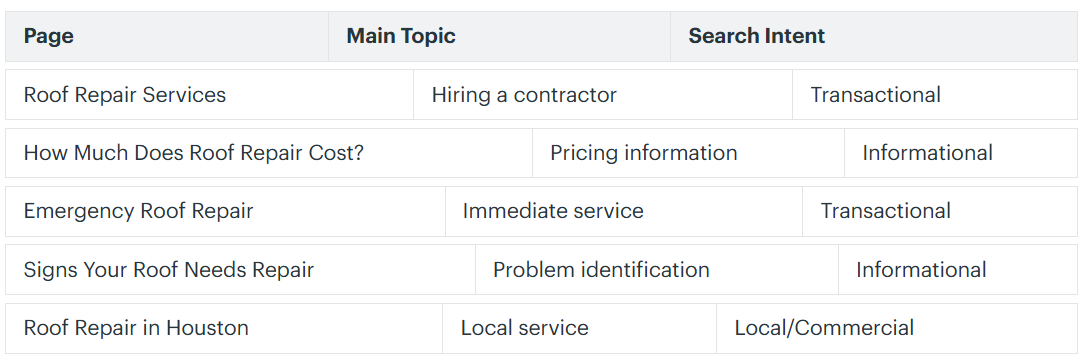
Supporting blog pieces can then address more specific questions.
Supporting content to the primary “technical SEO” page might include:
- SEO checklist technical
- What are canonical tags? Crawl Errors
- crawl budget meaning
- What are canonical tags?
- XML Sitemaps Best Practices
This is a topic cluster, not a set of competing pages.
Keep a Content Inventory
For each new piece of material you add, update your keyword map:
- Posted
- Redirected
- combined
- removed
- re-purposed
- substantially rewritten
This approach is becoming more and more crucial as websites expand.
8. Before creating content, understand search intent
Search intent is what the user wants to get from their search results.
Common intent categories are
Educational
The user wants to know.
For example:
- What is keyword cannibalization?
- How does technical SEO work?
- how to speed up the site
Transaction-based
The user is exploring alternatives.
Let us take an example:
- top SEO agencies
- SEO Software Reviews
- top local SEO tools
Exchange
The user would like to employ an SEO agency.
Examples:
- employ an SEO agency
- purchase an SEO audit
- SEO Consulting
Navigational
The user is looking for a particular website or brand.
For example:
- Google Search Console –
- Great SEO
- Sign in to Google Analytics
One of the simplest ways to avoid cannibalization is to provide different intents for the pages you link to.
For example:
Service page:
SEO Auditing Services
Educational use article:
What Is an SEO Audit?
Pricing article:
What is the cost of an SEO audit?
To-do list:
Full SEO audit checklist
All these pages are about SEO audits; however, each page is about a different need.
9. Merging Competing Pages
If cannibalization already exists, consolidation may be the best remedy.
Let’s say you have:
- /keyword-research-tutorial/
- How To Do Keyword Research
- keyword research tips
The three articles are almost identical in content.
Select the most powerful URL according to:
- backlinks
- traffic jam
- historical rank
- Quality of content
- conversions.”
- Simple URL
Then take the valuable material from the lesser pages and mix it into the best page.
Redirect old URLs where applicable.
This means a single, consolidated resource instead of three competitive pages.
Don’t Merge Pages Blindly
Consolidation of pages should only be done when their purpose overlaps significantly.
If the two pages are for different audiences or different purposes, it may be worth keeping them separate.
10. Enhance Internal Linking

Internal links are helpful for search engines to understand the relationship between pages
It can also support the assertion that a given page is the leading authority on a topic.
Let’s say your main page is for:
SEO Services
Supporting articles may link back to contextually relevant anchor text, such as “SEO services for” or “SEO experts.”
- Services of SEO experts
- SEO services for
- our SEO services
Don’t send mixed messages by randomly linking to numerous competitive pages using the same anchor text.
Internal linking must have a hierarchy.
Or think of it as
Main page
↓
Related Articles
↓
Narrower Subtopics
The main page becomes the main page for the broader subject.
Google also recommends linking internally to the URL you think is canonical, rather than linking inconsistently to duplicates.
11. Properly Use Canonical Tags
Canonical tags are useful when you have many URLs with the same or similar information.
The canonical tag tells search engines which URL you want to be treated as the canonical version.
For instance:
page-a? sort = price
may be canonicalized to:
page-a
This is very helpful for:
- URL parameters
- product variants
- category URLs filtered
- duplicate copies of the page
- tracking parameters
Google considers redirects and rel=”canonical” annotations to be stronger canonicalization signals than a page being in a sitemap. Ultimately Google determines which URL to treat as the canonical one.
Canonical Tags Are Not a Content Strategy
Don’t duplicate dozens of articles and think canonical tags will solve the problem.
Canonicalization works best with URLs that are true duplicates or near-duplicates.
If two pages serve different strategic functions, increase their differentiation.
12. Redirects When Removing Duplicate Pages
If you want to get rid of a redundant page (and point users and search engines to the page you want), you can do a 301 or other permanent server-side redirect.
Redirects are a powerful signal to Google for canonicalization.
For instance,
Old URL:
/seo-keyword-research-tips-2/
Forward to:
/keyword-research-2/
This is usually better than just deleting the old URL and leaving visitors with a 404 error when there’s a relevant alternative.
Redirects can help you retain the value of existing backlinks.
- backlinks
- bookmarks (0)
- traffic referrals
- older internal links
However, it is important to direct users to relevant content.
Don’t redirect irrelevant pages just for SEO value.
13. Distinguish Similar Pages
Sometimes both sides of a page are worth keeping.
In that case, distinguish them more sharply.
See, e.g. :
The crowd
A page can be made for starters.
Another could be aimed at enterprise marketing teams.
Funnel Phase
One page educates.
You create leads. The other.
Geographic emphasis
One page is for a national audience.
Another supports a particular service area.
Content Style
A single page could provide an in-depth guide.
Another can be a checklist, case study, comparison, calculator, or template.
Search Intent
Each page should address a different question.
The more specific the aim, the less likely the pages are to compete with each other for no reason.
14. Optimize Category, Product & Service Pages
Keyword cannibalization isn’t confined to blogs.
Commercial websites commonly go through it between:
- web pages
- category pages.
- product page
- service pages
- location landing pages
- tag archive
Service Pages
Don’t make very similar service pages just to try and target little variations of keywords.
For example, these might not require separate pages:
- SEO Consultant Service
- SEO consultancy services.
- professional SEO experts
If users expect roughly the same solution, one excellent site may do better.
Categories in Ecommerce
Broad commercial phrases are the aim for category pages.
Each product should focus on the individual product phrases.
Like so:
Category:
Men’s Running Shoes
Product:
Nike Pegasus Men’s Running Shoes
It generates a logical hierarchy.
15. Regularly Monitor Search Performance
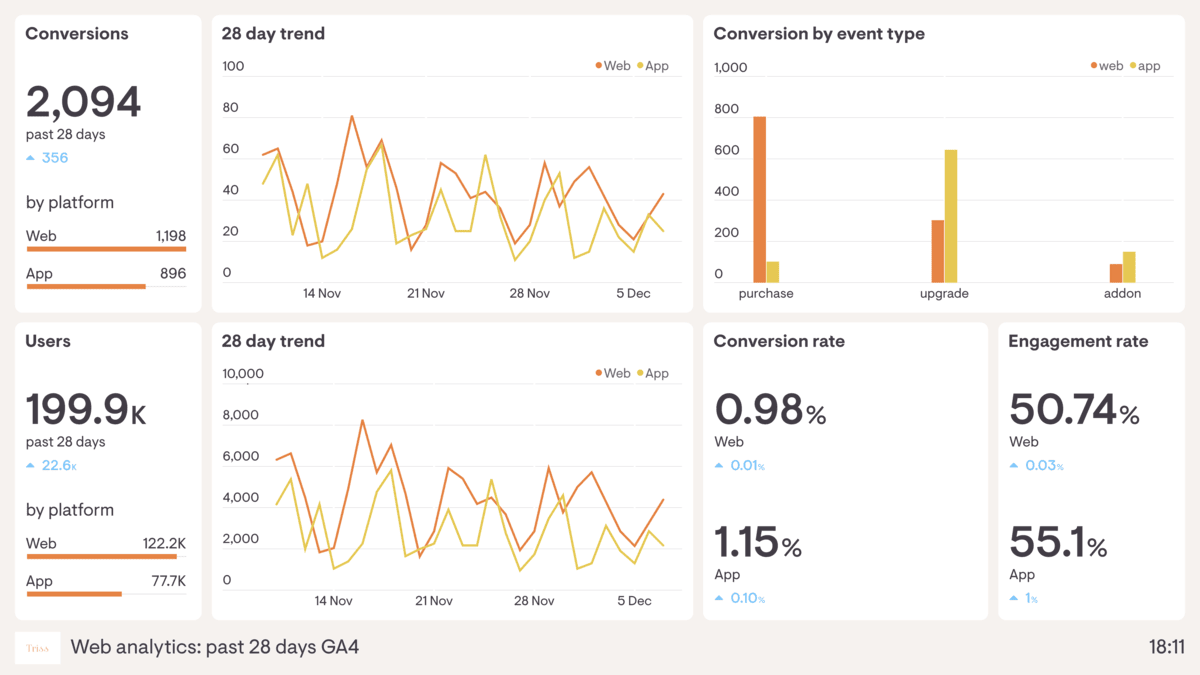
Cannibalization prevention is not a one-time project.
Websites should regularly monitor their pages.
Google Search Console is a fantastic tool for looking at queries and then examining the sites that come up for each query. It’s excellent for detecting unexpected overlaps of pages.
Google also warns that Search Console data might be tied to canonical URLs, and some searches are filtered or truncated for privacy and system reasons. So this data should be considered a key source of diagnostics, not a perfect list of all search inquiries.
Consider conducting cannibalization reviews:
- monthly for big websites
- quarterly for medium-sized locations
- before large content additions
- after transfer of web pages
- following significant content updates
Focus on commercial keywords that are very valuable.
16. Top Keyword Cannibalization Mistakes to Avoid
Knowing how to avoid keyword cannibalization means also avoiding overly forceful remedies.
Mistake #1: Deleting Every Keyword-Containing Page
Overlapping keywords is normal.
Pages should only be deleted or merged when intent and purpose are very similar.
Mistake 2: Changing Keywords But Not Intent
Cannibalization doesn’t automatically get solved by replacing one sentence with synonyms.
For example:
Page A: ‘SEO firm’
Page B: “website search engine optimization”
They are still able to compete, even if they’re providing the same service to the same audience.
They want relevance, not keyword stuffing.
Mistake #3: Overusing canonical tags
Canonical tags are a technological signal, not a replacement for effective content architecture.
Mistake #4: Default noindexing of competing pages
Noindexing might eliminate pages from search altogether.
Google explicitly frowns upon the use of noindex to influence canonical selection within a site. When pages are duplicates, Google recommends using canonicalization techniques instead.
Please ensure that the page is truly unavailable in search before applying a noindex.
Mistake #5: Publishing Without Researching Existing Content
Check your own site before allowing a new article.
Question:
- Do we have a subject for this?
- We can improve an existing article.
- Does the proposed page target a different intent?
- Is it better as a section in an existing resource?
A five-minute assessment can save years of content duplication.
Mistake 6: Using One Exact Keyword Per Page
Modern SEO should be more about subjects and intent rather than trying to force every site into a single exact match keyword.
A powerful page can rank on hundreds of relevant keywords.
Develop pages on related issues rather than different URLs for every small keyword variant.
17. FAQs
1. How to avoid keyword cannibalization in the best way?
The best way is to build a clear keyword/content map before you publish.
Assign relevant subject clusters to each page Define search purpose for each page Check if a page already exists to satisfy the same need before creating new content.
A good content architecture will be able to locate the main page for each of the important topics.
2. How to find keyword cannibalization on my website?
Check Google Search Console to see if there are multiple URLs from your site appearing in searches.
Then, see if those pages serve the same objective.
You may also do a content audit, check keyword rankings, look at internal links, and see if you have rival URLs that keep swapping places.
Having numerous pages ranking for relevant keywords isn’t necessarily a negative thing.
The underlying problem is excessive rivalry among pages that have a very similar search intent.
3. Should I remove pages competing for the same keyword?
Not always.First, is each of the pages providing unique value?
If they’re serving different search intents, both may deserve to stay.
If they are similar in substance and purpose, consider:
- joining the page
- optimizing one page
- redirecting to the weaker URL
- Updating internal links
- identifying its contents
As a rule of thumb, you should only delete after you’ve looked at the page’s traffic, backlinks, conversions, and strategic importance.
4. So can keyword cannibalization hurt rankings?
Because when you have a lot of pages trying to do the same thing, it can lead to unstable or worse organic performance.
Instead of a single authoritative website swallowing up a handful of URLs and then sharing backlinks, internal links, ranking authority, and engagement, a handful of URLs might be better.
However, Showing up on two pages for the same keyword doesn’t necessarily hurt your rankings.
You gotta see the big picture.
5. How regularly should I be checking for keyword cannibalization?
The best frequency depends on how often you publish and how big your site is.
Monthly reviews work well for large sites that post often.
Smaller sites tend to do audits quarterly.
You need to check for cannibalization too:
- Before posting substantial chunks of content
- following a website revamp
- migrated
- after big changes in the ranking
- with mixing content strategy
When multiple URLs begin to rank for the same high-value query, it can create confusion and dilute the effectiveness of your SEO strategy.
It’s easier to keep tabs on it than to update hundreds of overlapping pages later.
18. Guard Your SEO Strategy With Excel
Understanding how to avoid term cannibalization can be the difference between developing a website with clear topical authority and developing a site with pages that inadvertently compete with one another.
Not to cease talking about such things is the solution.
The most successful sites build depth naturally around their most important issues.
The goal is to make sure that each page has a purpose.
You need to map your keywords well, differentiate search intent clearly, link internally wisely, canonicalize correctly, manage redirects smartly and assess performance regularly.
These aspects working together make your website easier to understand both for visitors and for search engines.
Don’t just add pages to make the content volume larger. Focus on generating the proper pages, improving current resources, and creating clear linkages between themes.
That’s a strategy that can help safeguard search visibility, build topical authority, boost user satisfaction, and make every piece of content work harder for your organization.
Excel Improves Your Search Rankings
Your content should compete with your competitors, not with other pages on your own website.
At Excell, we help businesses construct better and more organized SEO strategies that are focused around search intent, content quality, technical performance, and long-term organic growth. If your website has overlapping keywords, outdated content, a complicated site structure, poor internal linking, or declining organic visibility, the right SEO strategy can help you identify the problem and get you on a more straightforward path forward.

Don’t let keyword cannibalization silently sabotage all the hard work you’ve previously put into your website.
Contact us today and Book your free discovery call to get done for your services.
Contact us:
EXCELL INDUSTRIES LLC
6420 Richmond Ave., Ste 470
Houston, TX, USA
Phone: +1 832-850-4292
Email: info@excellofficial.com